
Startline Progress
Your month-end schedule update, written from the site WhatsApp group. Foremen keep sending texts, voice notes and photos. Each one is read against your programme as it arrives, and your planner reviews and issues the updated P6 or MS Project file and the report pack.
- Your real P6 or MS Project file
- Text, voice notes and photos
- Planner in control
The progress is already in WhatsApp. Getting it into P6 is the slow part.
Built by planners who have spent month-ends scrolling site chats and keying actuals one activity at a time.
Calling each foreman for status, then searching a month of group chat for the day something actually started or finished.
Actual dates and percentages typed into P6 by hand, then the same story rebuilt in the client's Word, Excel and PowerPoint report.
Months later, nobody can say which message a date came from or who agreed to it.
Real site messages, and what went into the schedule
From a test in October 2026 on our demo programme, a B+G+8 residential tower: messages sent from a phone to the Startline WhatsApp line.
| Message from site | What went into the schedule |
|---|---|
| "L2 columns all 22 done yesterday" | ST-L2-10 Columns, Level 2: complete, actual finish 10 Oct |
| "Started L3 slab shuttering today" | ST-L3-20 Level 3 slab formwork and rebar: started 11 Oct |
| Voice note: "Level three slab rebar about sixty percent" | ST-L3-20: 60%, combined with the message above |
| "GF blockwork completed. 2 gangs started L1 blockwork" | Two updates: BW-GF-10 complete and BW-L1-10 started, flagged as out of sequence with the Level 3 slab |
| Photo: "L3 rebar in progress" | Kept as evidence for ST-L3-20 and printed in the monthly report |
| "Tomorrow concrete pump coming at 6am" | Not progress, left out |
Site shorthand is understood: GF, L2, cols, shuttering, steel fixing, "done yesterday". The issued P6 file was checked activity by activity.
From a foreman's message to an issued programme
Your site team changes nothing. Your planner gets a review screen instead of a blank spreadsheet.
-
01Site sendsDuring the month
Foremen and engineers message the project's WhatsApp number, or the planner loads the group's chat export.
INCLUDES- Text in site shorthand
- Voice notes
- Photos with or without words
-
02Read on arrivalAbout a minute
Each message is transcribed if needed, read, matched to an activity and checked against the logic.
RESULT- Activity, status, %, dates
- Match score and checks
- Chatter left out
-
03Planner reviewsWhen convenient
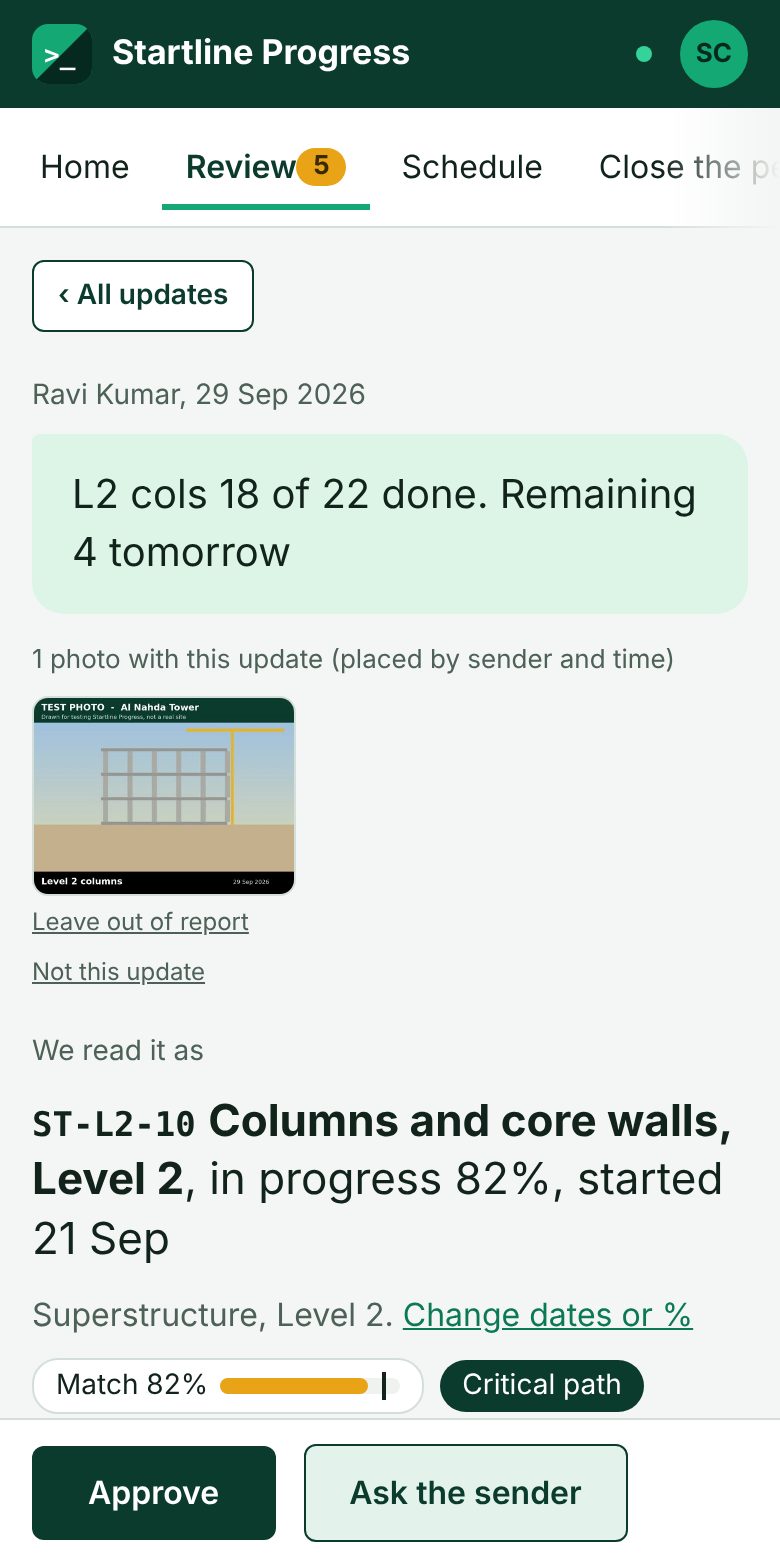
Every update sits beside the message it came from. Approve, correct, or ask the sender on WhatsApp in one click.
CONTROL- Unsure readings wait for you
- Any reading can be undone
- Every decision is logged
-
04Issue the periodAt cut-off
Set the data date and issue. The schedule files and the report pack come out together.
YOU GET- Updated P6 and MS Project files
- Word, PowerPoint and Excel report
- Decisions log
The agents and services behind each step
AI does the reading. Your programme's logic and your planner decide what is issued. The AI never writes to the schedule directly: its output goes through the same matching, checks and review.
| Step | Agent or service | What it does |
|---|---|---|
| Intake | WhatsApp Business Platform (Meta Cloud API) | Receives texts, voice notes and photos on the official API from the numbers listed on each project. Can send a short thank-you and the planner's questions back. |
| Listener agent | Google Gemini, with OpenAI transcription as backup | Turns voice notes into text, using the project's area names as hints. |
| Reader agent | Google Gemini | Reads each message into structured updates: place, work, status, percentage, start and finish dates. Resolves "today" and "yesterday" from the message date and leaves out chatter. |
| Matcher | Startline matching engine (rules, not AI) | Finds the activity in your programme from IDs, WBS, names, planned dates and the sender's usual area. Knows site shorthand and learns from your planner's corrections. |
| Resolver agent | Anthropic Claude | Called only when two activities are close. Picks from the matcher's shortlist and explains why. Applied only at 90% confidence or more; otherwise it goes to the planner. |
| Checker | Startline schedule checks | Flags out-of-sequence starts, assumed dates, dates outside the planned window, float and the critical path. Combines several messages about the same activity. |
| Planner | Your planner | Approves, corrects or rejects, asks the sender on WhatsApp, sets the data date and issues. |
| Writer | Startline schedule writer and report builder | Updates the P6 .xer field by field and writes the MS Project file, then builds the Word, PowerPoint and Excel report, or fills your client's own template. |
| Notifier | Microsoft 365 email | Tells the planners when a period is ready to issue, and sends a morning summary of what is waiting. |
Messages are sent to these AI providers' business APIs only to be read. Models are chosen per step and can be changed as better ones arrive.
What your planner works with
Screens from the demo project. Click any one to see it full size.
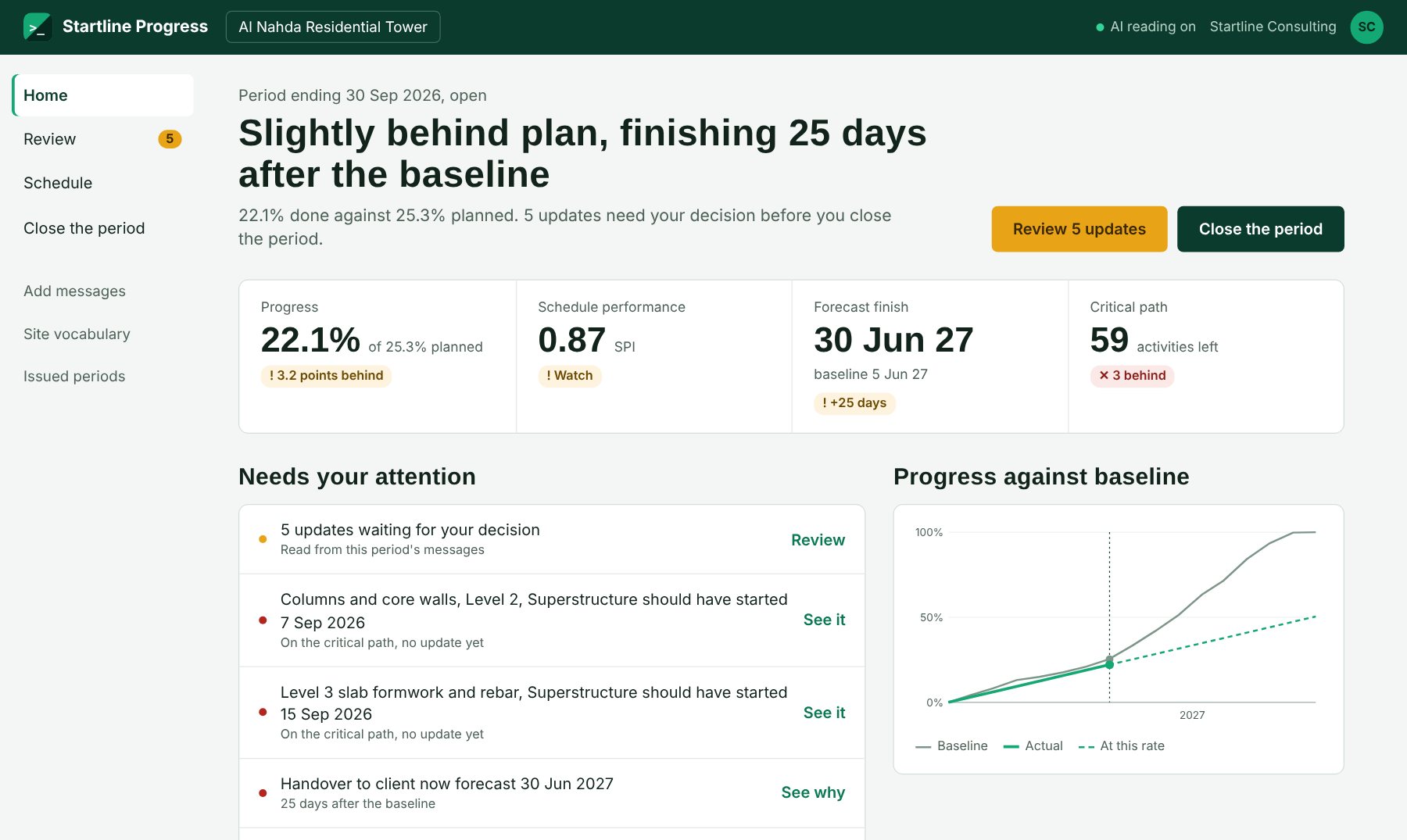
Progress against baseline, SPI, forecast finish and what needs the planner's attention.
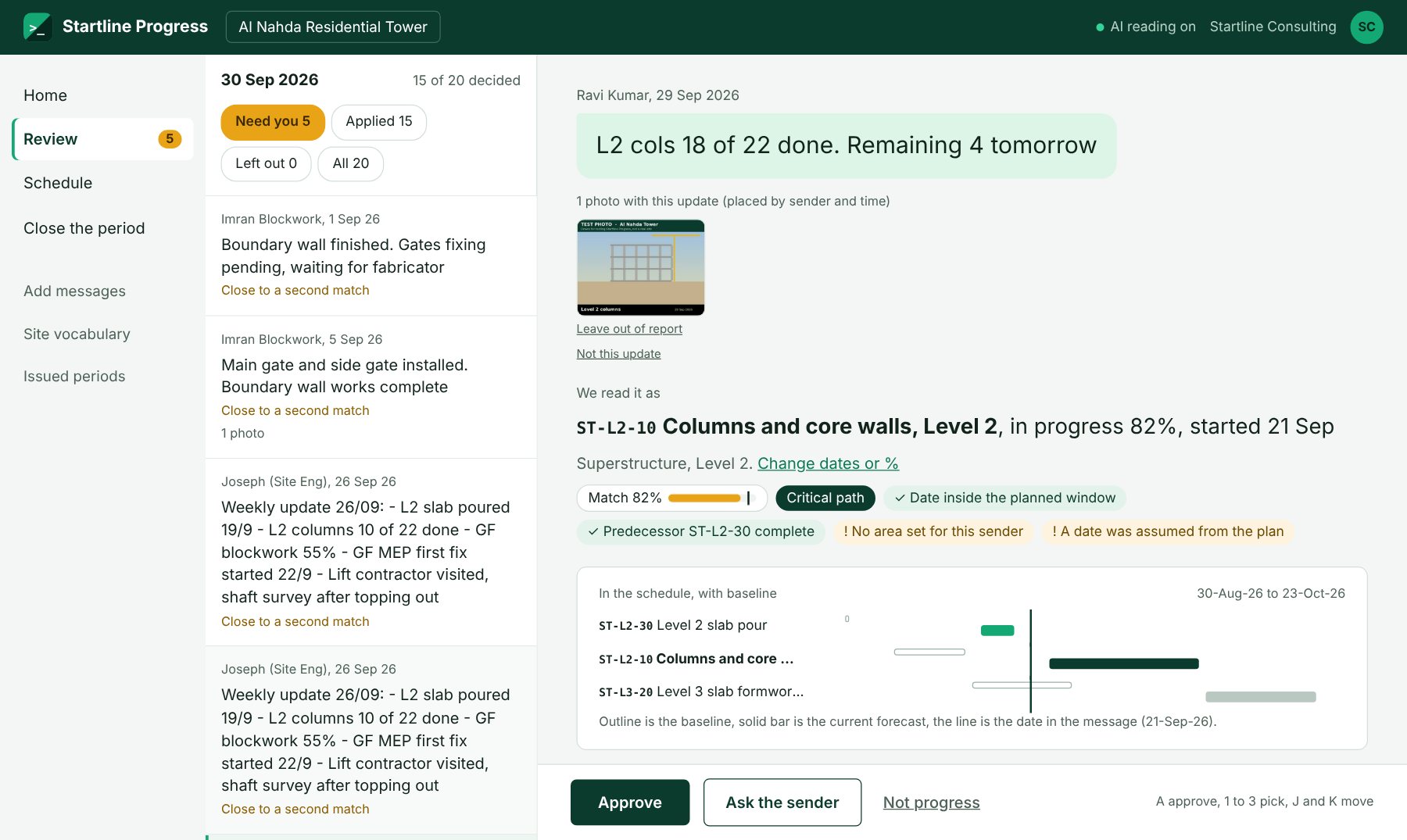
Each update beside its message and photo, with the match score, logic checks and a mini Gantt.
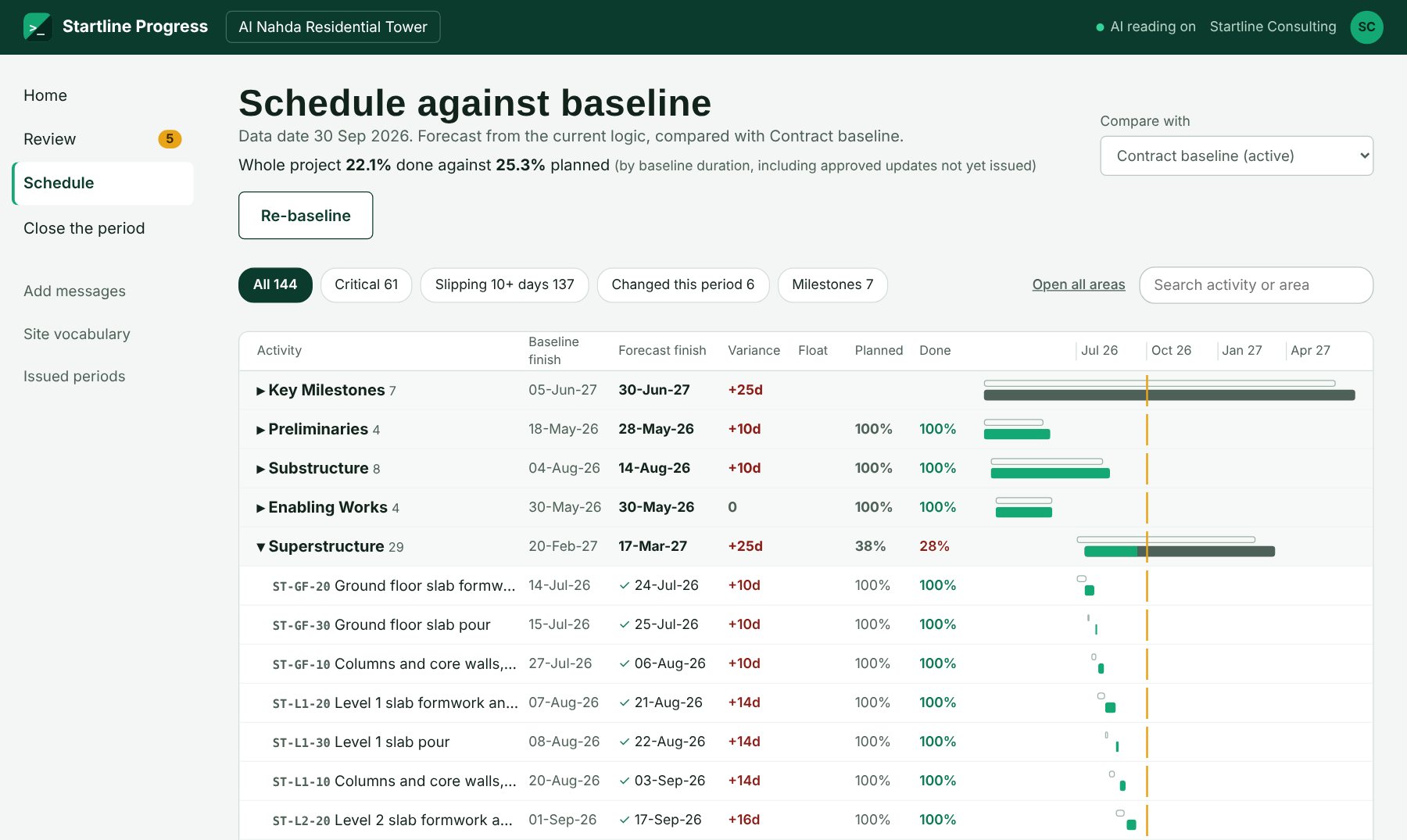
Planned and done for every area and activity, variance, float and the forecast against the baseline.
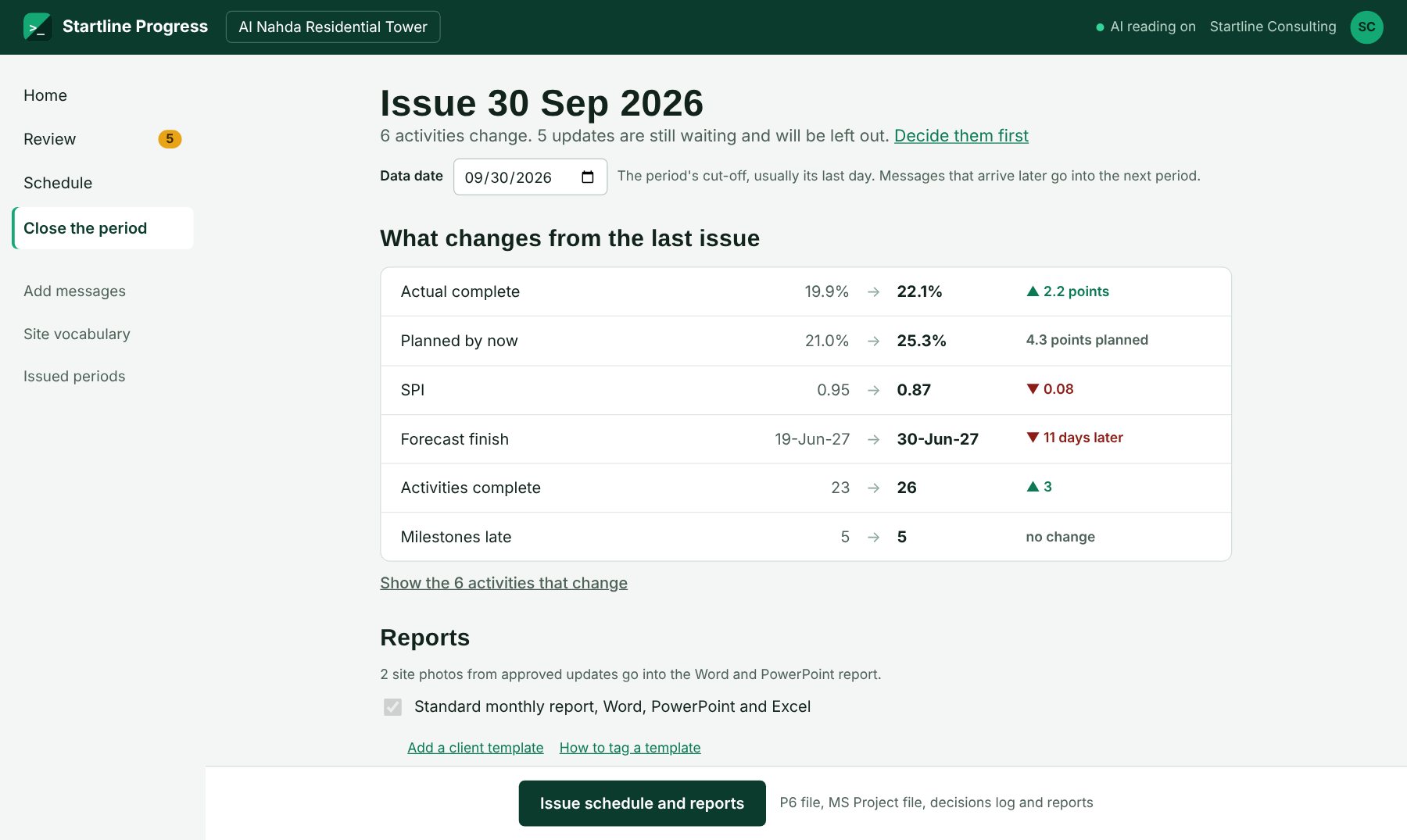
Set the data date, see what changes from the last issue, and issue the files and reports.
Every period, in the formats your client asks for
- Updated Primavera P6 .xer: actual dates, % complete and data date set, everything else untouched
- The same update as an MS Project file
- Monthly progress report in Word: S-curve, areas, delays, look-ahead and site photos
- PowerPoint slides for the progress meeting
- Excel workbook and a decisions log: every change, its message, sender and approver
- Or all of it on your client's own Word, Excel or PowerPoint template
Tested on programmes of up to 20,000 activities, P6 and MS Project.
Invite-only workspaces with admin, planner and view-only roles for the client's PM.
Use the Startline WhatsApp number, or connect your company's own WhatsApp Business number.
Schedules, messages, photos and reports are backed up every night.
One project, one month-end
We set Startline Progress up on one live P6 or MS Project job, connect the site WhatsApp, and run the month-end with your planner side by side with your usual update.
- 01Send us the programmeThe current .xer or MS Project file and the site team's numbers.
- 02Run the monthThe site team messages as usual. Your planner reviews as updates arrive.
- 03Compare at cut-offIssue both ways and compare the result and the time it took.
Pilot terms and price on request.
Common questions
Does the site team need a new app?
No. They keep using WhatsApp. They message the project's WhatsApp number, or the planner loads the group's chat export.
Which schedules does it work with?
Primavera P6 (.xer) and MS Project (.mpp or .xml). The updated programme comes back in both formats, with your baselines untouched.
Does it change the programme by itself?
Confident readings are applied to the open period and unsure ones wait for the planner. Your planner sees every reading beside its message, can undo any of them, and nothing is issued until the planner issues the period.
What about voice notes and other languages?
Voice notes are transcribed and read like text. English and everyday site shorthand are tested; other languages used on Gulf sites are being tested in pilots.
Can we use our own WhatsApp number?
Yes. A company's own WhatsApp Business number can be connected, so messages go only to that company's projects.
Where does our data go?
Each client company has its own invite-only workspace. Messages are read through the business APIs of the AI providers listed above, and everything is backed up nightly.
Try it on your next month-end.
One project, your real programme, your site team's own messages.